As Steve Jobs said, "Simple can be harder than complex." Since we've been building OpenSky and adding features every week for almost a year, it was time for us to take a step back and simplify.
That doesn't mean losing functionality, it means making it more obvious where functionality lives, thus making the product easier to use.
So we spent this release doing that work. Here's what's new in the simplest OpenSky yet.
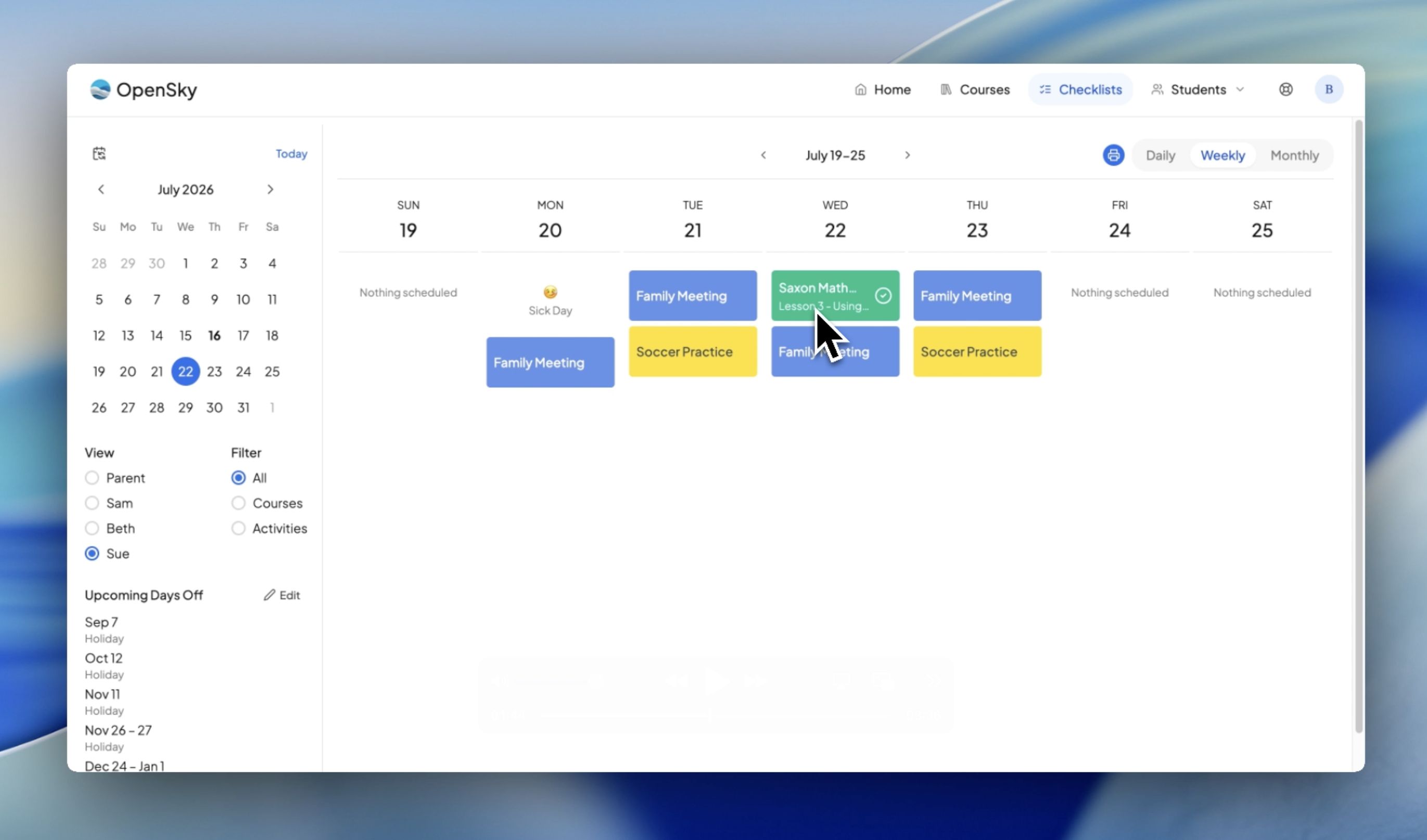
The Checklist and Planner are now one view.
No more wondering where to look, as everything your students are doing (lessons, events, and activities) live on a single page. Now with infinite scroll and instant drag-and-drop, and built in attendance it's easier than ever to manage your homeschool.
The checklist is where the majority of learning actually happens on OpenSky. When you or your students log in, this is the screen that answers the question: what am I doing today?
Everything is now one click away. Hover over any activity to check it off. Click a lesson and the course drawer opens with everything needed to complete it: instructions, materials, links. As a parent, you can grade lessons right from the checklist, review the work your student uploaded, and leave comments. Students get their own simpler version through the student dashboard, and permissions let you hand them more functionality as they grow more independent.
There are daily, weekly, and monthly views that are all printable, with detailed print settings you can customize.
And here's where it gets really powerful: attendance is built right in and synced with scheduling. Say a student was sick on Monday. Click the day, set it to a Sick Day and her lessons instantly move. Decide Wednesday should be a field trip instead? Add a "Trip to the Zoo" event: all students tagged, attendance counted, no courses scheduled that day. The whole schedule updates itself.
Rescheduling is just as effortless. Drag a lesson to another day and you're done. Drop it on a day that already has one, and OpenSky asks whether to double up or reschedule everything going forward. You can even sync holidays and school days to your Apple or Google calendar.
One place to add everything, fast
Should I add it to the planner? The course list? The CourseMap? Is it an event? An activity? A course? Forget it. Now you just tell OpenSky what you want to add — and bam, it's added.
Click Add, then describe what you want in your own words. You can even dictate it (we don't store your voice, we simply turn it into text). Say something like:
"Add a daily family meeting for every student, every weekday and add soccer practice for Sue, 2 to 3:30, every Tuesday and Thursday and Add Saxon 5/6 math for Sue"
In a few seconds, OpenSky processes everything into items ready to go. If something required is missing the item gets flagged so you can fill in the gap, hit Submit, and everything's added.
Introducing Family Courses
So much homeschool learning happens together. Now you can create one family course instead of copying it for every student.

Introducing Book List
Reading is to the mind what exercise is to the body — and for many families, the book log is a record of memories and a badge of honor. Now OpenSky treats books that way.
Every book your student reads can be logged in the Book List, with both a list view and a timeline view. Adding books is easy:
- Add manually — click "Add a Book" and it goes straight into your list with the date it was read.
- Tag courses and activities — track which book was read within which course, either while creating the course or right from the course list.
Over time, the Book List becomes a reading history your family can look back on for years.
Block scheduling, now optional
Most scheduling changes are simple: add a start date, maybe change a teaching day. Now you can make these straightforward changes right from the course list with no need to open the block scheduling tool. And don't worry: all the block scheduling tools remain for when you need them.
Try it
Start your OpenSky free trial and see the new checklist with your own courses. One plan covers unlimited students; details are on the pricing page.