
Gradebook
See every grade for a student in one place.
Updated
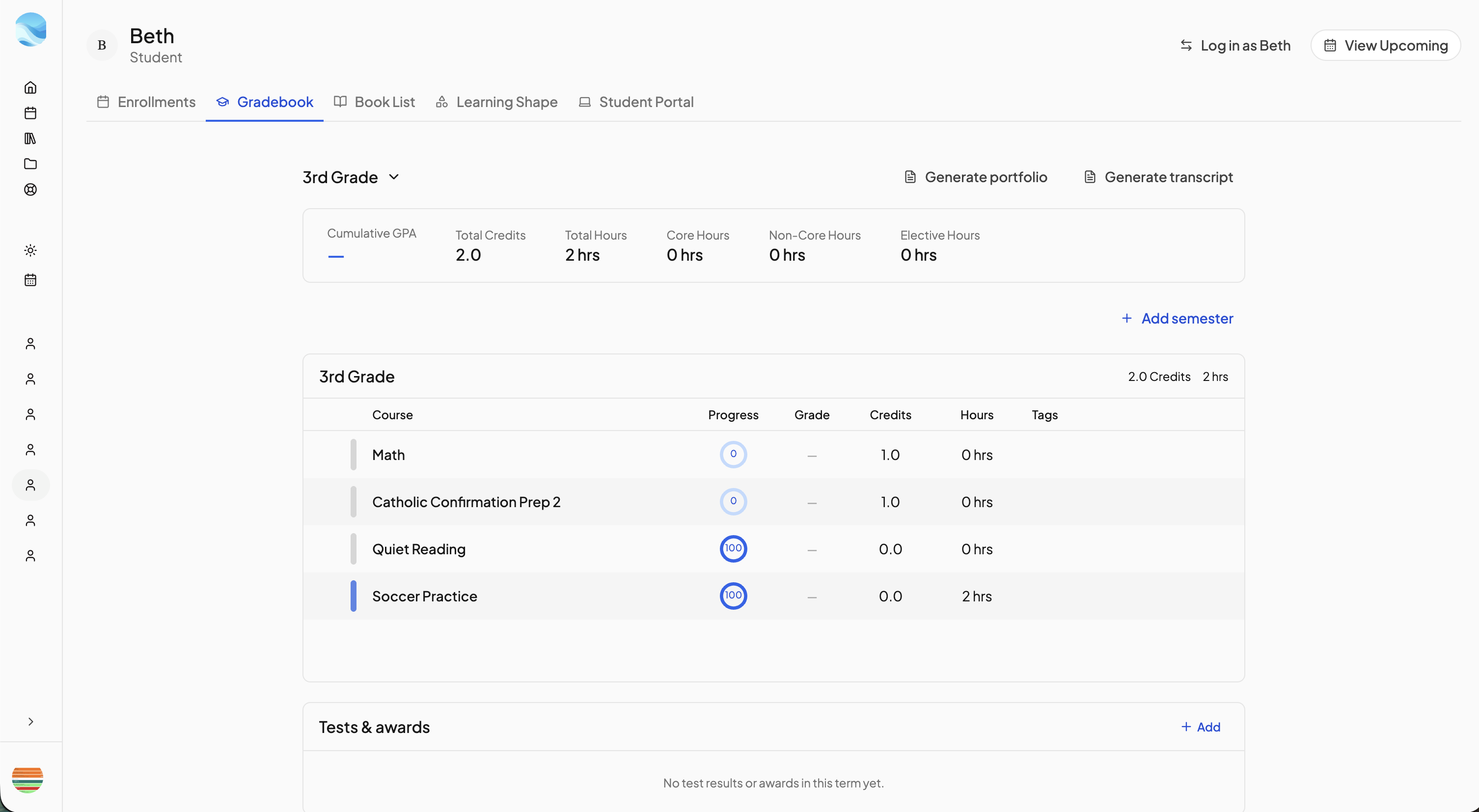
The Gradebook is one student's record for one school year: every course with its grade, credits and hours, the GPA and hour totals, and the student's test results and awards. Open it from the Gradebook tab on the student's page.
The picker in the header chooses the school year. Manage grades at the bottom of it opens the organizer that puts courses into a year: expand Unassigned courses and click Add to grade. A course appears here, and on transcripts, only once it is in a year. See Where's my course? if a course is missing.
Reading the page#
The bar at the top shows Cumulative GPA, Total Credits, Total Hours, and Core Hours, Non-Core Hours and Elective Hours.
Each row shows the Course, its Progress, Grade (a letter, or — when there is none), Credits, Hours and Tags. Click a row to grade it lesson by lesson (see Lessons). The gear opens Course Settings; the × takes the course out of this year but keeps its grades and lessons.
Hours and tags#
Hours come from completed lessons whose completion date falls inside the year. Each lesson logs the course's Default hours per lesson (Course Settings, Display tab) unless you type a different figure in the grading view's Hours column. Skipped lessons log nothing.
The Tag chip on a row sets what its hours count toward: Core, Non-Core or Elective. A course with two tags counts fully in both totals, and an untagged course counts only in Total Hours.
Semesters#
Click Add semester to split the year into columns, then drag rows between them; click a column's name to rename it. The ⋯ menu on a column has Add additional credit, for an outside course, with a Title, Credits and a free-text Grade.
Activities#
An activity gets a row when Add to parent grading queue is ticked on it, and belongs to the school year it was added to. Its gear opens Activity grading settings for an override, credits and hour tags. The × removes it from the gradebook only.
Tests & awards#
Under the columns, Add records a Test result or an Award. For a test, pick a preset (Iowa Assessments, Stanford 10, MAP Growth, PSAT, SAT, ACT and others) or Custom, then fill in the Name, Date taken, Term and scores. Private notes (only parents see these) and an attached score report go with it. Both kinds print on transcripts, even records that are Not in a term.
Generate portfolio and Generate transcript sit in the header. See Generating a portfolio and Transcripts.
Need more help?#
Reach out any time at support@openskyplanner.com and we will be happy to help.