
Grading styles
Choose between grading every lesson, grading a course as a whole, or not grading at all.
Updated
How a course is graded is set per course, on the Grading tab of Course Settings. Open it from the … menu on a course under Enrollments and choose Course settings, or click the gear on the course's row in the student's Gradebook.
Three ways to grade a course#
Lesson by lesson. Leave Course grade override off and enter grades on individual lessons; OpenSky works out the course grade from them. To be reminded of every lesson still waiting on a grade, switch on Appear in Ungraded column. See Lessons.
One grade for the whole course. Switch on Course grade override and enter it as Numeric (a percent), Pass / Fail or Standards-Based (Exceeds, Meets, Approaching or Below). It replaces the calculated grade wherever it shows, and the gradebook marks the course Override. Lesson grades are kept, so turning it off brings the calculated grade back.
Not at all. Leave lessons ungraded and the override off. The course shows — in the gradebook's Grade column but still counts its credits and hours, and still prints on a transcript.
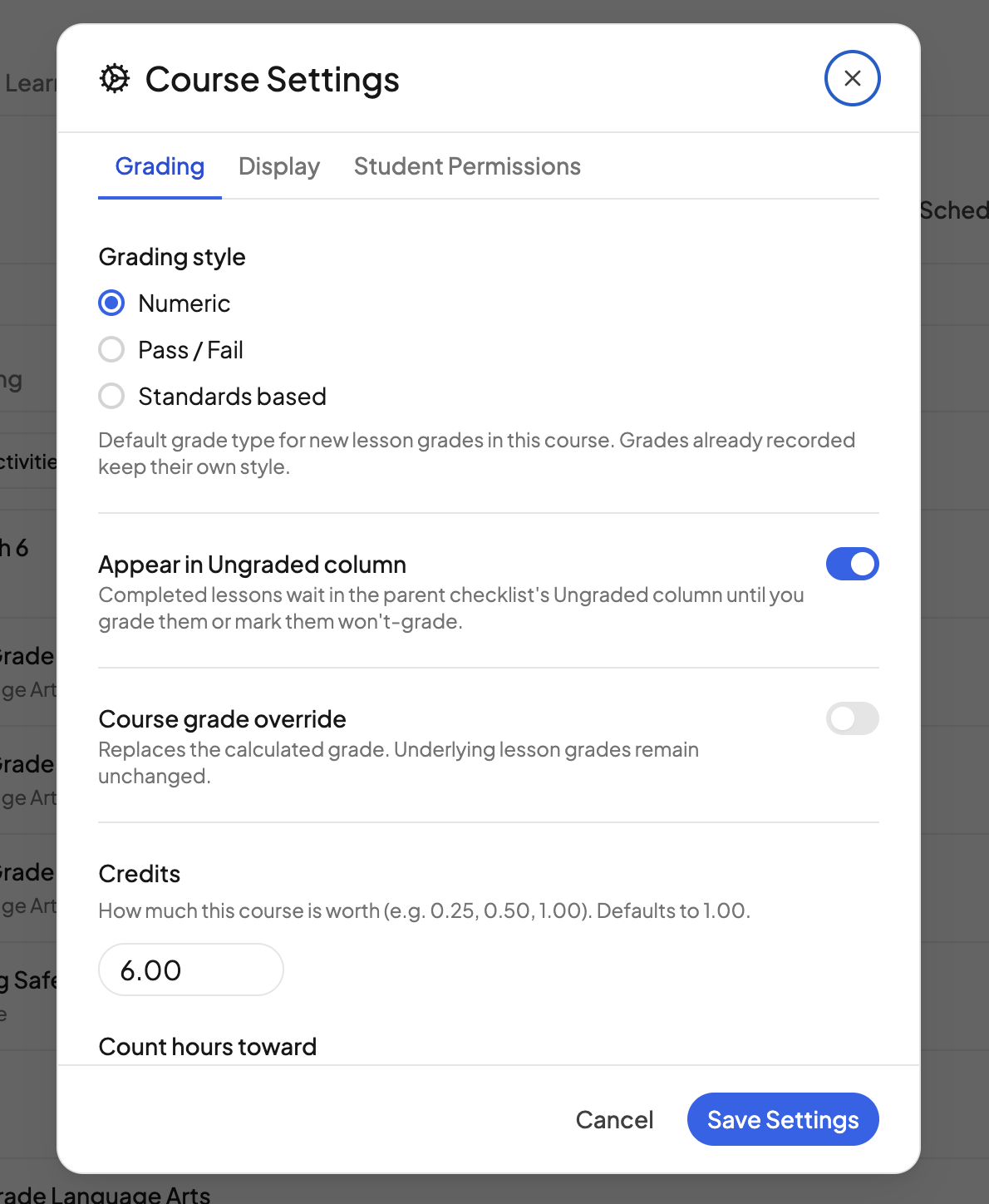
Grading style#
Grading style (Numeric, Pass / Fail or Standards based) is the default for new lesson grades in the course. A grade keeps the style it was entered in, and you can switch the style for one lesson from its grade options.
How the calculated grade works#
Every lesson has a type (Lesson, Quiz, Test, Activity or Lab), set in the Lesson Type column of the gradebook's grading view. Numeric grades are averaged within each type and combined using Category weights: Tests 40%, Quizzes 25%, Lessons 25%, Activities 5% and Labs 5% unless you change them. Pass / Fail and standards-based lesson grades do not go into the percent. See Adjusting grade weights.
Letters follow a standard scale: A at 90 and above, B at 80, C at 70, D at 60, F below that. GPA uses the letter (A 4, B 3, C 2, D 1, F 0) weighted by credits; a pass/fail or standards-based course grade counts toward credits but not GPA.
Credits and designations#
The same tab sets Credits (1.00 unless changed) and Transcript designations: Honors, Advanced Placement, International Baccalaureate, Dual Enrollment, In-progress and Audit. Both print on the transcript. See Transcripts.
Need more help?#
Reach out any time at support@openskyplanner.com and we will be happy to help.