
Billing
Changing to annual
Switch from monthly to annual billing and see how the change is prorated.
Updated
Annual billing costs less than twelve monthly payments. You can switch at any time from your billing settings, and Stripe credits you for the unused part of the current month.
Switching#
- Click the three dots "..." by your profile icon and go to Settings, then Billing & Passwords in the left nav.
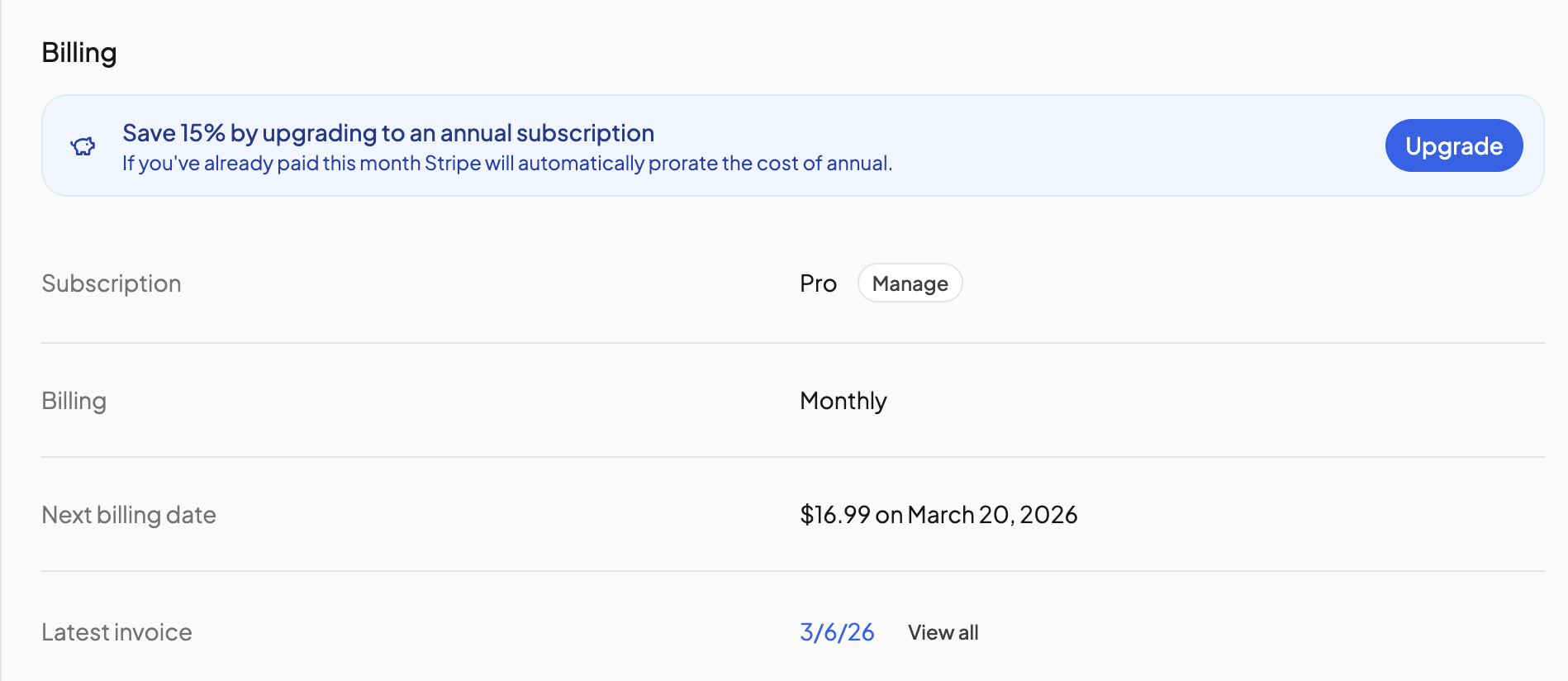
- In the Billing section, find the banner Save X% by upgrading to an annual subscription and click Upgrade.
- Review the amount on the Stripe page that opens and confirm.
- You are returned to OpenSky, which confirms You're now on annual billing. The Billing row now reads Annual.
What you are charged#
- If you have already paid this month, the annual price is charged today minus a prorated amount for the days you've already paid for this month. Your renewal date becomes a year from today.
- If you are still in your free trial, nothing is charged now. The trial runs to its end and the annual price is charged then.
The annual price is shown in your local currency on the pricing page.
If the Upgrade button is missing#
- You are in the iOS or Android app. Open OpenSky in a web browser and do it there.
- A promo or referral discount is still running. Switching becomes available after the promotional period ends.
- Your subscription is scheduled to cancel. Click Reactivate Subscription first.
- A payment has failed. Update your card first. See Updating billing.
Need more help?#
Reach out any time at support@openskyplanner.com and we will be happy to help.