
Manage students
Add, edit and remove students, and give each one access to their own dashboard.
Updated
Students are added under Settings → Manage Students. Each student gets their own checklist, calendar, gradebook and, if you want, their own sign-in.
Adding a student#
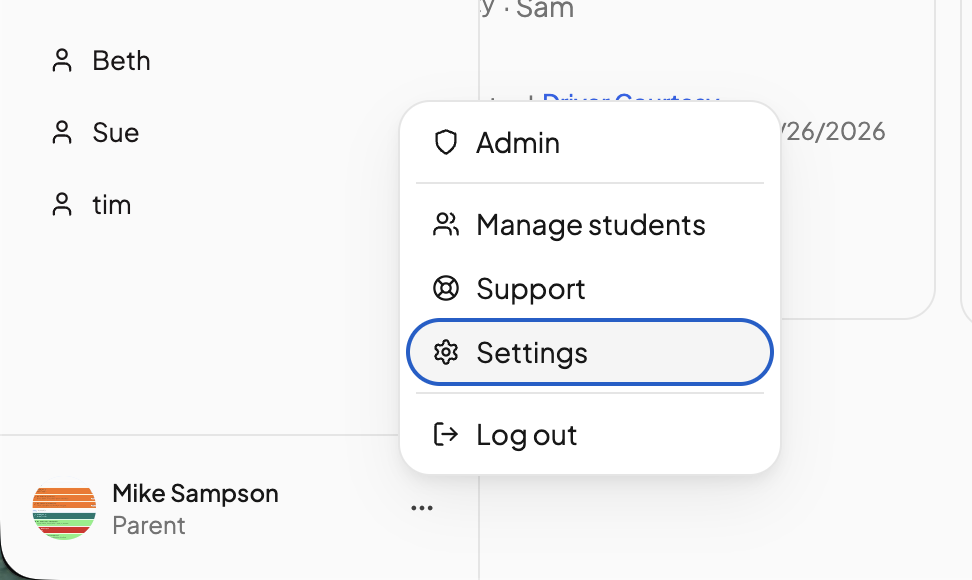
- Click the three dots '...' near your profile icon and go to Settings, then Manage students in the left nav.
- Click Add Student.
- Fill in Student Name and Birthday, and optionally a Grade.
- Choose a School year. Pick an existing one, or click Create school year and set a Start Date and Goal End Date.
- Click Add Student.
The school year is the calendar lessons are scheduled onto. You can add more later. See Adding a new school year.
Editing a student#
Open the … menu on the student's row and click Edit to change their name or birthday, then click Update Student. Grade belongs to a school year rather than the student, so it is changed on the student's calendar, where you manage school years.
Removing a student#
Open the … menu and click Delete. This is permanent: the student's transcripts, attendance and lesson history are deleted with them, and there is no archive. If you only want a student out of the way for a while, leave them in place and pause their courses instead. See Pausing a course.
Giving a student their own sign-in#
Each student can sign in to their own dashboard. From the student's page, open the Student Portal tab and click Grant access. There are three ways in:
- Email sign-in — enter the student's email and click Send invitation. They accept the link and sign in with a code sent to that address, with no password to remember.
- One-time code — click Generate one-time use access code and give the student the code. They enter it at app.openskyplanner.com/access on their own device and stay signed in until they log out. The code is single-use and expires, so generate it when the student is ready to sign in.
- Profile switch — on a shared device, switch between profiles with a parent PIN. See Profile swap PIN.
The same tab holds the student portal settings that control what a student can do. See Student access and Permissions.
Parents are not students#
A parent or guardian is added from Parent Access, not here, and never counts as a student. See Invite other parents.
Need more help?#
Reach out any time at support@openskyplanner.com and we will be happy to help.